
Cloud Backup Strategies Every SMB Needs to Protect Their Business Data

Key Takeaways
- Automated, scheduled backups eliminate the risk of human error and missed backup windows.
- Immutable backups protect your data even if ransomware compromises your primary systems.
- Defined RTO and RPO targets ensure your backup plan actually aligns with how your business operates.
- Regular restore testing is the only way to confirm your backups will work when you need them.
- Managed cloud backup services deliver enterprise-level protection without requiring in-house IT expertise.
Your business data is one of your most valuable assets and losing it, even temporarily, can be devastating. For small and mid-sized businesses across South Florida, the risks are real: ransomware, hardware failures, accidental deletions, and even hurricanes can wipe out years of critical files in moments. The question isn’t whether something will go wrong, it’s whether you’ll be ready when it does.
At C&W Technologies, we’ve been helping local businesses protect their data and recover from disruptions since 1985. Over the years, we’ve seen firsthand what separates companies that bounce back quickly from those that don’t. It almost always comes down to one thing: a reliable, well-managed cloud backup strategy.
This guide walks you through the essential cloud backup strategies your business should have in place and explains why working with a managed IT partner makes all the difference.
What Is RTO and RPO and Why Does It Matter for Your Backup Plan
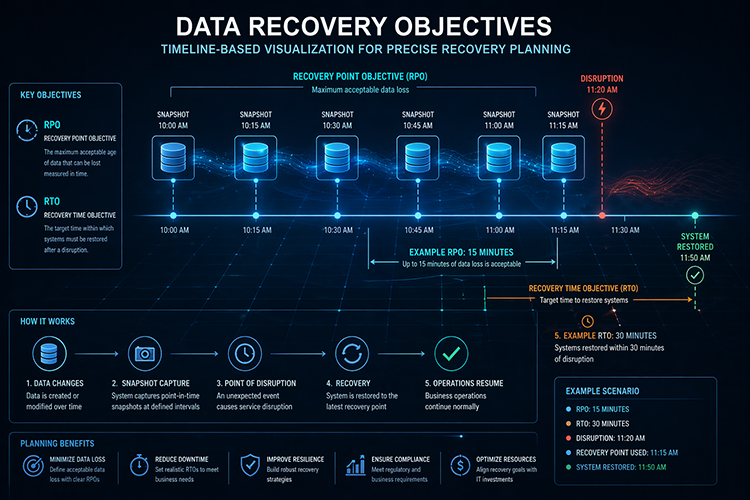
Before diving into specific strategies, it’s important to understand two terms that shape every backup decision: Recovery Time Objective (RTO) and Recovery Point Objective (RPO).
Your RTO defines how quickly you need to be back up and running after a disruption. If your business can’t afford more than two hours of downtime, your backup and recovery infrastructure needs to support that timeline.
Your RPO defines how much data loss is acceptable. If you back up your systems once a day, you could lose up to 24 hours of data in a failure. If that’s too much, you need more frequent backups.
These two targets directly shape every other decision in your backup strategy, including how often you back up, where you store data, and what recovery tools you use. Setting clear RTO and RPO targets before building your plan is one of the most important things an SMB can do. Most businesses only discover these gaps after an incident, which is the worst time to find out.
Automated, Scheduled Cloud Backups
One of the biggest reasons SMB backup strategies fail is simple: people forget to run them. Manual backup processes are unreliable. They depend on someone remembering to do it, to verify it is completed, and to catch any errors before they compound.
Automated cloud backups remove that risk entirely. With the right configuration, your files, servers, applications, and databases are backed up on a consistent schedule without anyone having to think about it. Backup jobs run overnight, alerts notify your team if anything fails, and every copy is stored securely in the cloud.
According to research, human error and process failures remain among the top contributors to operational disruptions for businesses of all sizes, making automation not a luxury but a foundational requirement.
Automation also enables more frequent backups without more overhead. Instead of a once-daily backup window, automated systems can run incremental backups throughout the day, capturing smaller changes continuously and minimizing potential data loss.
For SMBs that don’t have dedicated IT staff, this is especially valuable. You get consistent, reliable data protection without needing someone actively managing it day-to-day.
Immutable Backups and Ransomware Protection
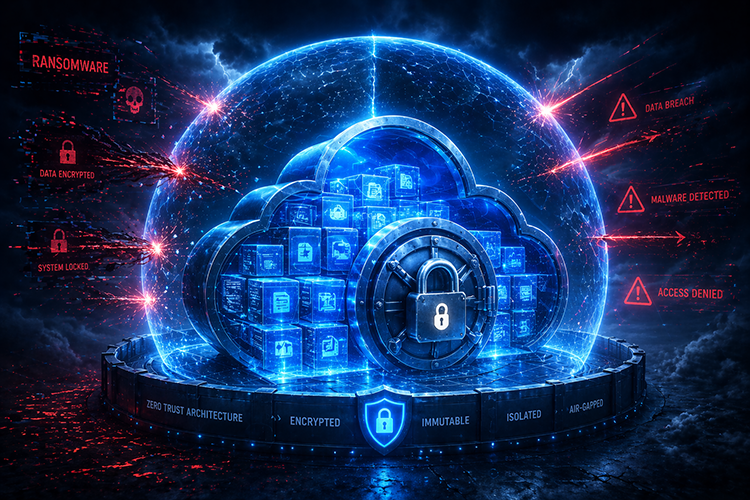
Ransomware is one of the fastest-growing threats facing SMBs today. A large majority of ransomware incidents show attackers specifically attempt to corrupt or destroy backup systems, not just production environments. If backups are reachable, they can also become a target.
This is where immutable backups become critical. An immutable backup cannot be altered, deleted, or encrypted after it’s written, not by users, not by administrators, and not by malware. Even if ransomware compromises your network and moves laterally through your systems, it cannot touch a properly configured immutable backup.
For SMBs in regulated industries, healthcare, legal, and financial services, immutable backups also support compliance requirements by ensuring data integrity and preventing unauthorized modification.
Immutability is typically achieved through Write Once, Read Many (WORM) storage configurations or isolated backup environments with no shared credentials to production systems. When paired with encrypted storage and multi-factor authentication, immutable backups form the strongest possible layer of ransomware protection available to SMBs.
Tiered Data Classification and Backup Frequency
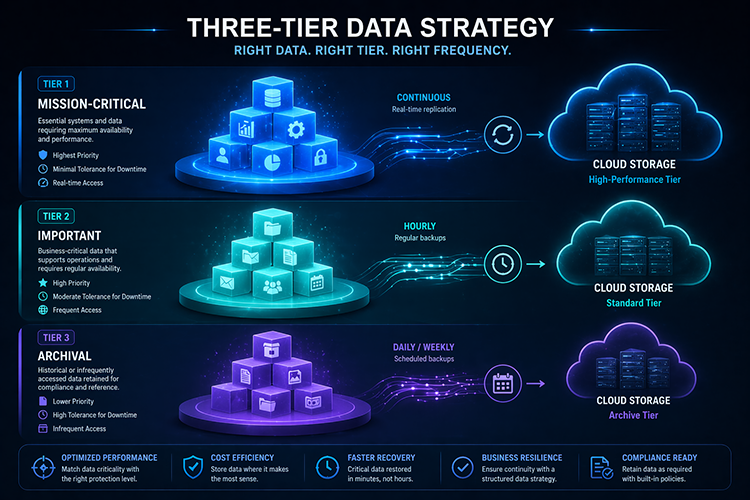
Not all data is equally important, and not all data needs to be backed up at the same frequency. A sound cloud backup strategy applies tiered backup policies based on how critical each data set is to daily operations.
A practical tiering approach looks like this:
- Tier 1 – Mission-Critical: Core databases, customer records, financial data, active project files. These warrant continuous or hourly backups with 90+ day retention.
- Tier 2 – Important: Operational data that changes daily but isn’t immediately business-critical. Daily backups with 30-day retention typically work well here.
- Tier 3 – Standard: Archival data, historical records, or data that changes infrequently. Weekly backups with shorter retention windows are generally sufficient.
Tiering your backup strategy does two things. First, it ensures your most critical systems recover fastest. Second, it prevents you from overspending on storage by not applying your most aggressive backup policies to everything uniformly.
This is where working with a managed IT provider makes a significant difference. Properly classifying your data, assigning the right policies, and maintaining those policies as your business grows requires ongoing expertise.
Disaster Recovery Planning and Failover Configuration
A backup is not a disaster recovery plan. Backups store copies of your data. Disaster recovery defines how your business gets back to normal operations after a disruption and how fast.
A proper disaster recovery plan includes documented recovery procedures, clearly defined RTO and RPO targets, failover configurations for critical systems, and a designated team that knows exactly what to do when something goes wrong. It also includes regular testing.
Most SMBs skip the testing step. They assume that because the backup job completed successfully, the data is recoverable. But a completed backup job doesn’t confirm data integrity, schema compatibility, or whether the restore will finish within your RTO window. The only way to know your recovery plan works is to actually test it.
At C&W Technologies, we configure disaster recovery plans for businesses across the Treasure Coast and Palm Beach region, including failover strategies, tested restore workflows, and compliance-aligned procedures for industries like healthcare, legal, and financial services. We don’t just set it up and walk away. We test it, monitor it, and update it as your business evolves.
Why Managed Cloud Backup Services Deliver Better Results
Setting up a basic cloud backup tool is easy. Building a reliable, secure, and fully tested backup and recovery environment is not. Most SMBs that try to manage cloud backups independently run into predictable problems: missed configurations, gaps in coverage, backup jobs that fail silently, and no documented recovery process.
Managed cloud backup services solve all of this. Instead of relying on an internal team member to monitor backup health, troubleshoot failures, and maintain policies across your entire environment, you have a dedicated team doing it for you with the right tools, the right expertise, and 24/7 monitoring.
Here’s what that looks like in practice:
- Automated monitoring catches backup failures before you do, with alerts and remediation.
- Compliance alignment ensures your backup policies meet HIPAA, financial regulations, or legal confidentiality requirements relevant to your industry.
- Storage optimization keeps costs predictable by right-sizing your backup environment and removing redundant data.
- Rapid restore capabilities mean that file-level recoveries, full system restores, and ransomware rollbacks happen in minutes.
- Documented DR planning gives you a tested, written process so recovery isn’t improvised under pressure.
The cost difference between a managed solution and the cost of a single data loss incident is not close. Managed cloud backup is one of the highest-ROI investments an SMB can make.
Final Takeaway
A cloud backup strategy is an ongoing commitment to keeping your business operational when things go wrong. The businesses that recover fastest from data loss incidents are the ones that planned: automated backups, immutable copies, tiered policies, tested recovery procedures, and a partner who monitors everything around the clock.
The strategies outlined here aren’t theoretical. They’re what real SMBs need to stay resilient against ransomware, hardware failures, human error, and the unpredictable realities of running a business in South Florida.
With over 40 years of experience supporting local businesses across the Treasure Coast and Palm Beach region,C&W Technologies delivers managed cloud backup and disaster recovery services that go far beyond basic data storage. We design, implement, monitor, and test complete backup environments, so your data is always protected, always recoverable, and always aligned with how your business actually operates. If you’re not confident in your current backup strategy, we’ll help you fix it before it becomes a crisis.