
7 Types of Cloud Backup Every South Florida Business Should Know
Key Takeaways
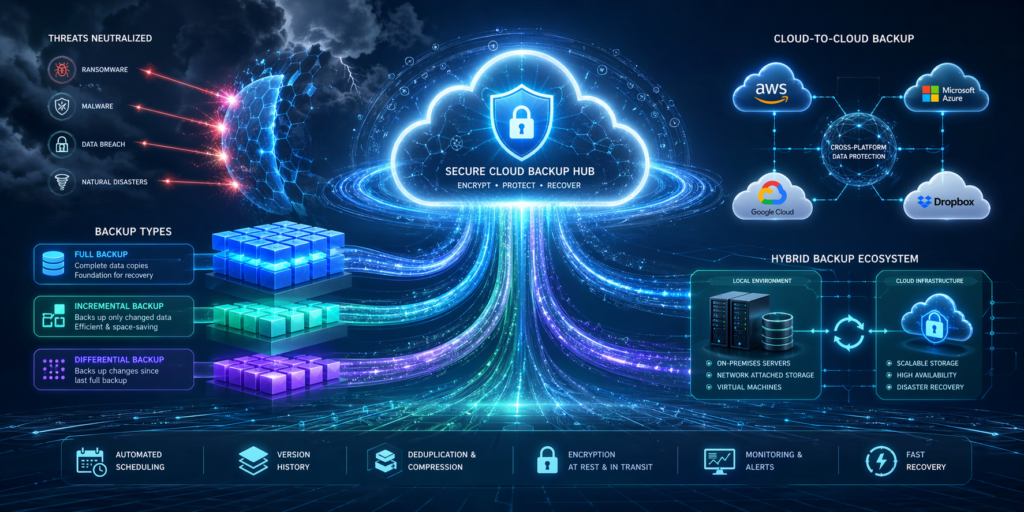
- Not all cloud backup methods are created equal. Each type serves a different purpose, speed requirement, and storage cost
- Full backups provide the most complete protection but require the most storage and time
- Incremental and differential backups help reduce storage costs and improve backup speed
- Cloud-to-cloud backup is essential for businesses relying on Microsoft 365 or other SaaS platforms
- Managed cloud backup and disaster recovery services remove the burden of monitoring, testing, and recovery planning from your internal team
Losing business data is not just an inconvenience, it can be catastrophic. Many businesses that experience critical data loss shut down within months, making it a serious risk for small and mid-sized organizations. The good news is that cloud backup technology has made it easier than ever to protect your data without needing a large in-house IT department.
At C&W Technologies, we work with businesses across the Treasure Coast and Palm Beach every day to help them understand their options and build backup strategies that actually work. Whether you are running a medical office in Stuart, a law firm in Jupiter, or a construction company in Palm City, understanding the types of cloud backup available is the first step toward protecting what matters most.
1. Full Backup
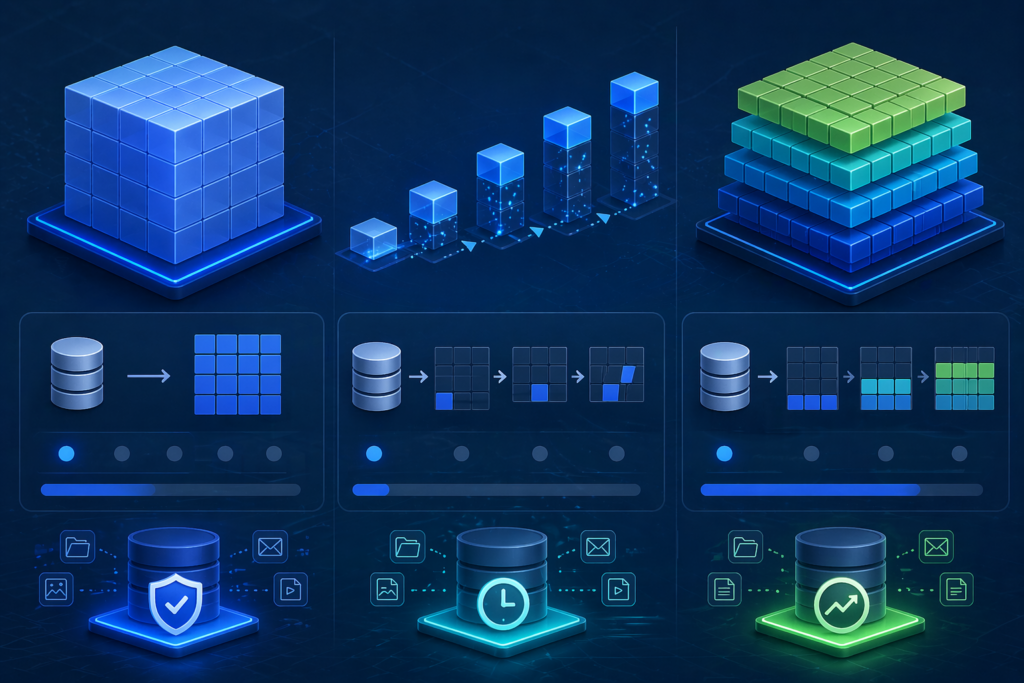
A full backup is exactly what it sounds like. A complete copy of all your selected data, every single time the backup runs. Every file, folder, database, and application included in the backup scope is copied to cloud storage, regardless of whether anything has changed since the last run.
Full backups are the foundation of any solid data protection strategy. They serve as a complete restore point that does not depend on any other backup existing first. The tradeoff is that full backups consume more storage space and take longer to complete than other methods.
Most businesses use full backups as a weekly or baseline event, then layer faster, lighter backup methods on top of that foundation throughout the rest of the week. For highly regulated businesses like healthcare practices or CPA firms, full backups also provide clean, audit-ready snapshots of data at a given point in time.
2. Incremental Backup
Incremental backup is one of the most efficient backup methods available. Instead of copying all data every time, it only captures what has changed since the last backup, whether that was a full backup or another incremental backup. This dramatically reduces both storage usage and the time it takes to complete each backup cycle.
The drawback is that restoring from incremental backups is more complex. To recover your data, you need the original full backup plus every incremental backup that followed, in the correct sequence. This can extend recovery time if something goes wrong, which is why incremental backup works best when paired with a well-managed disaster recovery plan and tested regularly.
For businesses with large volumes of data that change frequently, such as construction firms tracking project files or law offices managing case documents, incremental backup strikes a strong balance between storage efficiency and data protection.
3. Differential Backup
Differential backup is a middle ground between full and incremental backup. Every differential backup captures all data that has changed since the last full backup, not since the last backup of any kind. This makes the restoration process simpler than incremental backup because you only need two restore points: the most recent full backup and the most recent differential.
The tradeoff is that differential backups grow larger over time. Each new differential contains everything from the last full backup forward, so by the end of a week, a differential backup may include several days’ worth of accumulated changes. Storage consumption increases as the time gap from the last full backup grows.
Differential backup is a smart option for businesses that need faster recovery times without the complexity of managing a long chain of incremental backups. It is widely used by professional services firms and financial offices that need straightforward recovery processes.
4. Direct-to-Cloud (Public Cloud) Backup
Direct-to-cloud backup involves sending copies of your data directly to a public cloud storage platform such as Microsoft Azure, Amazon Web Services, or Google Cloud using backup software on your end. The cloud platform acts as a secure, offsite repository for your data.
This approach works well for businesses that already have backup software in place and simply need a reliable, scalable destination for their data. It is cost-effective and provides geographic redundancy, meaning your backups are stored in a data center far enough from your business location to survive a local disaster like a hurricane or power grid failure, both real concerns for South Florida businesses. To meet CISA (Cybersecurity & Infrastructure Security Agency) guidelines, this method fulfills the ‘1’ in the 3-2-1-1-0 Backup Rule: keeping at least one copy off-site and physically separated from your primary network to ensure survivability during regional disasters.
One key requirement is that your backup software must be compatible with the cloud storage API being used. Most enterprise-grade backup tools today support this natively, but configuration and security settings need to be managed carefully to ensure your data is encrypted in transit and at rest.
5. Cloud-to-Cloud (C2C) Backup
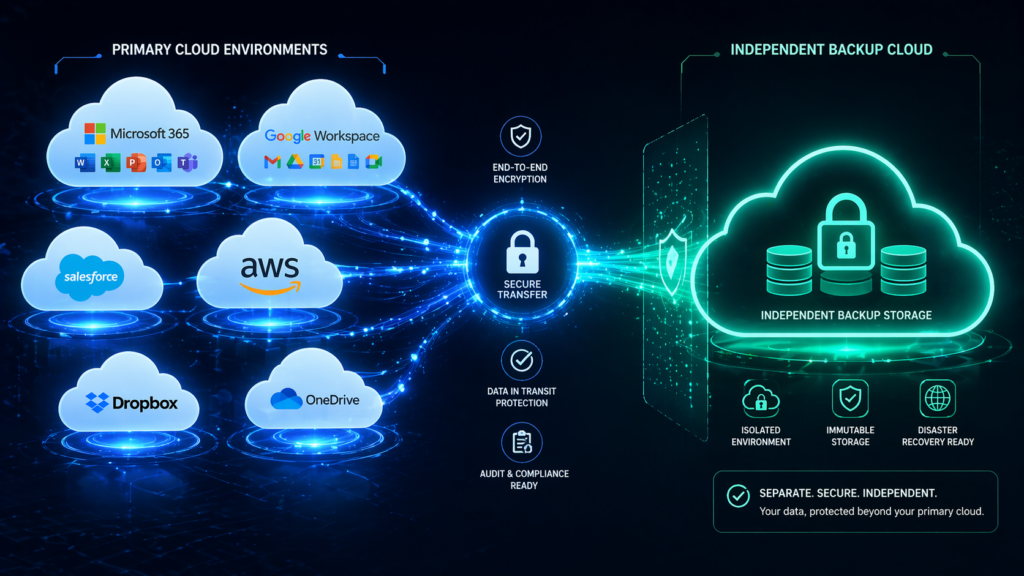
Cloud-to-cloud backup is one of the most overlooked but critically important backup types for modern SMBs. If your business uses Microsoft 365, Google Workspace, Salesforce, or any other cloud-based application, your data lives in that vendor’s cloud and many business owners assume the vendor is responsible for backing it up. That assumption is dangerous.
Most SaaS providers are responsible for keeping their platforms running, not for recovering your individual business data if it is accidentally deleted, corrupted, or targeted by ransomware. Cloud-to-cloud backup solves this by copying your cloud application data to a separate, independent cloud environment, completely outside the control of the original vendor.
C2C backup creates an independent copy that attackers cannot reach through your primary environment. For any business relying on Microsoft 365 for email, files, or Teams communication, this is essential.
6. On-Premises-to-Cloud (Hybrid) Backup
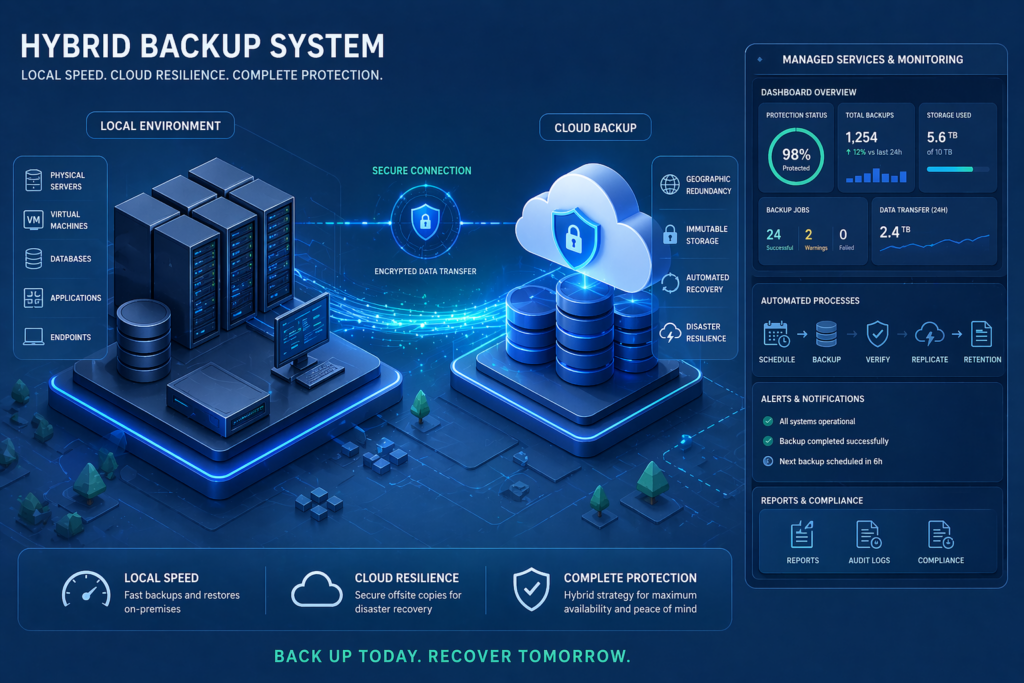
On-premises-to-cloud backup, often called hybrid backup, bridges the gap between local storage and cloud protection. Your data is first backed up to a local storage device, such as a network-attached storage drive or backup appliance and then replicated to cloud storage automatically.
The benefit of this cloud backup approach is speed. Restoring small files or recent data can happen quickly from the local copy, avoiding the time and bandwidth cost of pulling everything down from the cloud. For larger disasters or complete system recovery, the cloud copy provides the offsite protection you need.
Hybrid backup is particularly well-suited for businesses with on-premises servers, large databases, or latency-sensitive applications. It provides the best of both worlds: fast local recovery for day-to-day incidents and durable cloud protection for worst-case scenarios.
7. Managed Backup as a Service (BaaS)
Backup as a Service takes cloud backup a step further by putting the entire process, including configuration, monitoring, testing, alerting, and recovery, in the hands of a managed service provider. Instead of your team managing backup schedules, checking for failures, and verifying restore points, a dedicated team handles all of it on your behalf.
This matters more than many business owners realize. In many cases, backups exist but have never been tested, schedules have drifted, or storage has filled up and recent backups were silently failing. Managed BaaS solves all of these problems by making backup health a monitored, accountable service with clear documentation and regular testing.
For businesses in regulated industries such as healthcare, legal, and finance, managed backup also ensures that retention policies, encryption standards, and compliance requirements are met consistently. There is no guessing, no manual tracking, and no scrambling to prove compliance after an incident.
Final Takeaway
Choosing the right type of cloud backup is not about picking the most expensive option; it is about matching your backup strategy to your business risk, recovery requirements, and data profile. Most SMBs benefit from a layered approach: incremental or differential backups for daily efficiency, full backups as a weekly baseline, cloud-to-cloud protection for SaaS data, and hybrid backup for on-premises systems. The critical element that ties it all together is active management, monitoring, and regular testing.
Protecting Your Business Starts With the Right Backup Plan
Data loss is not a question of if, it is a question of when and how prepared you are when it happens. At C&W Technologies, we have been helping businesses across the Treasure Coast and Palm Beach build reliable, secure backup and disaster recovery strategies since 1985. We understand the real-world challenges South Florida businesses face. From hurricane season outages to ransomware attacks to accidental file deletion and we build backup solutions that address those risks directly.
Our managed cloud backup and disaster recovery services deliver secure storage, fast recovery, and minimized downtime for your most critical data, without requiring a dedicated internal IT team to manage it. Whether you need to protect Microsoft 365 data, on-premises servers, endpoints, or regulated client records, we have the expertise and the tools to keep your business running no matter what.
If you are not confident your backups are working the way they should, now is the right time to find out. Book a consultation with our team and we will help you close the gaps before they become a crisis.